Faure FTE230 Bedienungsanleitung Seite 8

  • Herunterladen
  • Zu meinen Handbüchern hinzufügen
  • Drucken
  • Seite
    / 18
  • Inhaltsverzeichnis
  • LESEZEICHEN
  • Bewertet. / 5. Basierend auf Kundenbewertungen
Seitenansicht 7
8
Avant la première utilisation de votre sèche-
linge, faites-le fonctionner pendant 30
minutes environ, en chargeant le tambour de
quelques chiffons humides (essorés), ceci afin
d’éliminer d’éventuelles traces de poussières
ou de graisses.
Pour sécher votre linge:
1. Branchez l’appareil.
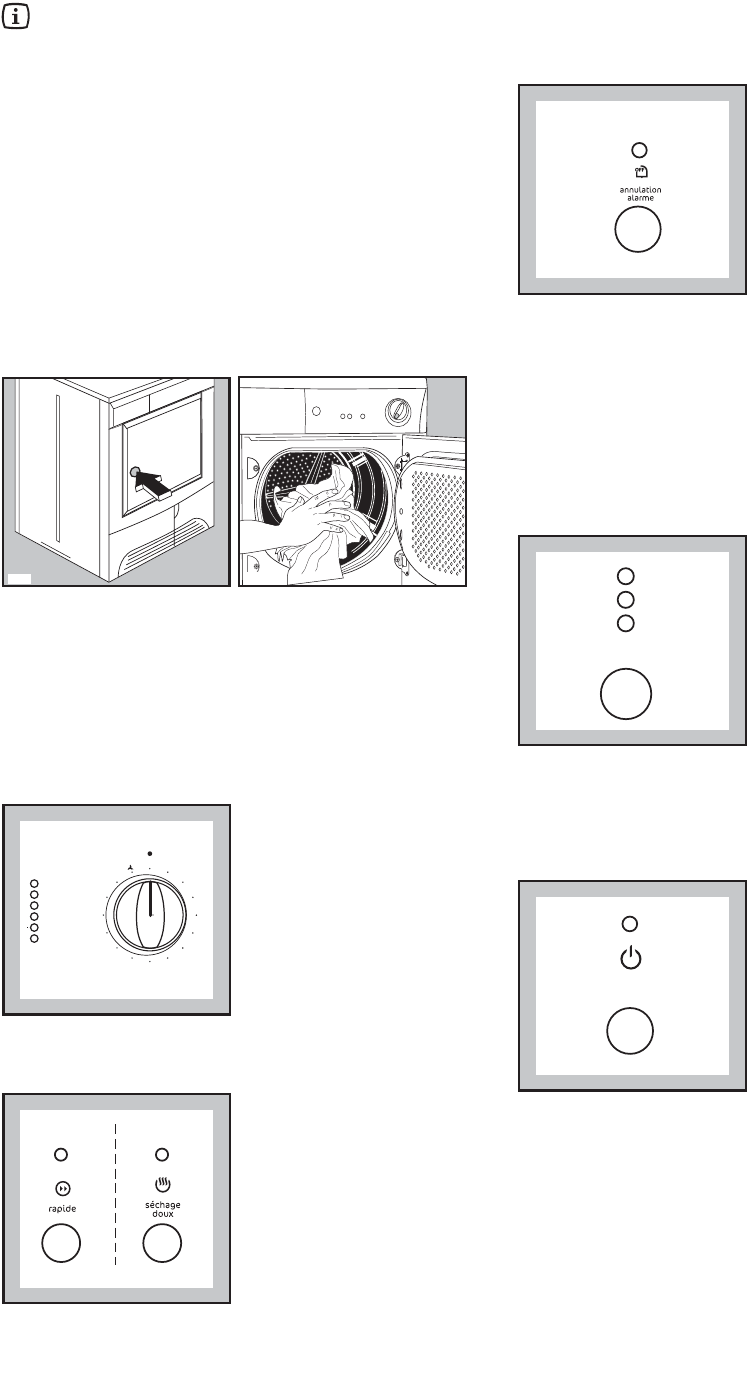
2. Ouvrez la porte en appuyant sur le point de
pression marqué sur la porte (voir croquis).
3. Dépliez les pièces de linge une à une et
introduisez-les dans le tambour.
4. Fermez la porte. Assurez-vous que le linge ne
reste pas coincé entre la porte et le filtre.
5. Sélectionnez le programme ou le temps de
séchage.
Les voyants “séchage”, “refroidissement”, “fin”
(correspondant aux phases composant le
programme) s’allument.
6. Sélectionnez éventuellement l’option “rapide” ou
«séchage doux».
séchage
refroidissement
filtres
bac plein
condenseur
fin
PROGRAMME
L
30
60
90
D
0
G
J
K
F
E
C
B
A
P1108
P1149
7. Enclenchez éventuellement la touche “annulation
alarme” si vous souhaitez supprimer l’alarme
sonore.
8. Sélectionnez éventuellement l’option “départ
différé”.
Avant de faire démarrer le programme, si vous
souhaitez en retarder le départ, appuyez sur la
touche “départ différé” pour sélectionner le
nombre d’heures au bout desquelles vous
souhaitez que le programme démarre.
Le voyant correspondant s’allume.
9. Démarrez le programme en appuyant sur la touche
“départ /pause”: le voyant correspondant arrête de
clignoter et seul le voyant de la phase en cours
reste allumé.
Si le départ différé a été sélectionné, le
décompte en heures commence.
Aucune modification au programme ou au départ
différé ne peut être faite après le départ.
Si le programmateur est tourné sur une autre
position au cours du programme, les voyants des
phases clignotent et un signal acoustique
retentit.
départ
pause
départ
différé
3h
6h
9h
Comment faire un séchage?
Seitenansicht 7
1 2 3 4 5 6 7 8 9 10 11 12 13 ... 17 18

Kommentare zu diesen Handbüchern

Keine Kommentare

Nedis SEC-DVR504 podręczniki

Instrukcje obsługi i podręczniki użytkownika dla Cyfrowe rejestratory wideo (DVR) Nedis SEC-DVR504.
Dostarczamy 1 pdf podręczników Nedis SEC-DVR504 do pobrania za darmo według typów dokumentów: Dokumentacja


Nedis SEC-DVR504 Dokumentacja (258 strony)


Marka: Nedis | Kategoria: Digital Video Recorders (DVR) | Rozmiar: 4.84 MB |


Spis treści

SEC-DVR504, SEC-SETDVR20

1

SEC-SETDVR30, SEC-SETDVR40

1

ENGLISH

2

About this manual

3

Package contents

3

Technical specifications

3

Safety precautions:

5

Product description

6

Description of the mouse:

8

Installation instructions

9

User instructions

9

Live view:

10

Record setting:

10

Manual recording:

11

Schedule recording:

11

Video playback:

11

Video edit:

11

Backup edited files:

12

File back-up:

12

Backup by time:

13

Network settings:

13

Mobile Phone Support

13

Maintenance:

15

Warranty:

15

Disclaimer:

15

Disposal:

15

DEUTSCH

17

Dieses Handbuch

18

Verpackungsinhalt

18

Technische Daten

19

Sicherheitsvorkehrungen:

21

Beschreibung des Produkts

21

Beschreibung der Maus:

23

Installationsanleitungen

24

Gebrauchsanleitungen

24

Anmeldung:

24

Live Ansicht:

25

Status und Toolbar:

25

Aufnahmeeinstellungen:

25

Manuelle Aufnahme:

26

Zeitgesteuerte Aufnahme:

26

Videowiedergabe:

26

Video bearbeiten:

27

Backup bearbeitete Dateien:

27

Dateibackup:

28

Backup nach Zeit:

28

Netzwerkeinstellungen:

28

Wartung:

31

Garantie:

31

Haftungsausschluss:

31

Entsorgung:

31

FRANÇAIS

32

À propos de ce manuel

33

Contenu de l'emballage

33

Spécifications techniques

34

Consignes de sécurité :

36

Description du produit

36

Description de la souris :

38

Notice de montage

39

Mode d'emploi

39

Connexion :

39

Vue en direct :

40

Enregistrement manuel :

41

Enregistrement programmé :

41

Lecture vidéo :

41

Montage vidéo :

42

Sauvegarde des fichiers :

43

Sauvegarde par date :

43

Paramètres réseau :

43

Entretien :

46

Avis de non responsabilité:

46

Elimination:

46

NEDERLANDS

47

Inhoud verpakking

48

Technische specificaties

49

Veiligheidsmaatregelen:

51

Productbeschrijving

51

Beschrijving van de muis:

53

Installatie-instructies

54

Gebruiksaanwijzing

54

Inloggen:

54

Live-weergave:

55

Status- en werkbalk:

55

Opname-instelling:

55

Handmatig opnemen:

56

Geplande opname:

56

Video afspelen:

56

Videobewerking:

56

Bestand-back-up:

57

Back-up op tijd maken:

58

Netwerkinstellingen:

58

Onderhoud:

61

Afvalverwerkingsinstructies:

61

ITALIANO

62

Riguardo a questo Manuale

63

Contenuto della confezione

63

Specifiche tecniche

64

Descrizione prodotto

66

Descrizione del telecomando:

67

Descrizione del mouse:

68

Istruzioni di installazione

69

Istruzioni utente

69

Accesso:

69

Vista live:

70

Stato e barra strumenti:

70

Registrazione manuale:

71

Registrazione programmata:

71

Riproduzione Video:

71

Editare un filmato video:

71

Backup dei file editati:

72

Salvataggio file:

72

Salvataggio per ora:

73

Impostazioni di rete:

73

Supporto Telefono Cellulare

73

Manutenzione:

75

Garanzia:

75

Smaltimento:

75

ESPAÑOL

77

Sobre este manual

78

Contenido del paquete

78

Especificaciones técnicas

79

Precauciones de seguridad:

81

Descripción del producto

81

Descripción del ratón:

83

Instrucciones de instalación

84

Inicio de sesión:

85

Visionado en directo:

85

Ajustes de grabación:

86

Grabación manual:

86

Grabación programada:

86

Reproducción de vídeo:

86

Edición de vídeo:

87

Configuración de red:

88

Soporte de teléfono móvil

89

Mantenimiento:

91

Garantía:

91

Exención de responsabilidad:

91

Eliminación:

91

PORTUGUÊS

92

Acerca deste manual

93

Conteúdo da embalagem

93

Especificações técnicas

93

Precauções de segurança:

95

Descrição do produto

96

Descrição do rato:

98

Instruções de Instalação

99

Instruções para o utilizador

99

Entrar:

99

Visualização directa:

100

Definição da gravação:

100

Editar Vídeo:

101

Gravação manual:

101

Gravação agendada:

101

Reprodução de vídeo:

101

Hora de cópia de segurança:

103

Definições de rede:

103

Suporte para telemóvel

103

Manutenção:

105

Garantia:

105

Eliminação:

105

Tartalomjegyzék:

107

A kézikönyvről

108

A csomag tartalma

108

Műszaki adatok

109

Biztonsági óvintézkedések:

111

A termék leírása

111

A távirányító leírása:

112

Az egér leírása:

113

Üzembe helyezési útmutató

114

Használati útmutató

114

Bejelentkezés:

114

Élő nézet:

115

Státusz és eszköztár:

115

Felvételi beállítások:

115

Kézi felvételkészítés:

116

Ütemezett felvételkészítés:

116

Video lejátszása:

116

Videószerkesztés:

116

Fájl biztonsági mentése:

117

Hálózatbeállítás:

118

Mobiltelefonok támogatása

118

Karbantartás:

120

Jótállás:

120

Sisällysluettelo:

122

Tietoja tästä käyttöoppaasta

123

Pakkauksen sisältö

123

Tekniset tiedot

123

Varotoimenpiteet:

125

Tuotteen kuvaus

126

Kauko-ohjaimen kuvaus:

127

Hiiren kuvaus:

128

Asennusohjeet

129

Käyttöohjeet

129

Kirjaudu sisään:

129

Live-näkymä:

130

Tila ja työkalupalkki:

130

Tallennusasetukset:

130

Manuaalinen tallennus:

131

Ajastettu tallennus:

131

Videotoisto:

131

Videon muokkaaminen:

131

Verkkoasetukset:

133

Matkapuhelintuki

133

Kunnossapito:

135

Vastuuvapauslauseke:

135

Hävittäminen:

135

SVENSKA

137

Om denna instruktionsbok

138

Förpackningen innehåller

138

Tekniska specifikationer

139

Säkerhetsanvisningar:

141

Produktbeskrivning

141

Beskrivning av musen:

143

Installationsinstruktioner

144

Användarinstruktioner

144

Inloggning:

144

Direktvisning:

145

Status och verktygsfält:

145

Inspelnings inställning:

145

Manuell inspelning:

146

Schemalagd inspelning:

146

Video uppspelning:

146

Videoredigering:

146

Säkerhetskopiering av fil:

147

Säkerhetskopiera efter tid:

148

Nätverksinställning:

148

Mobiltelefonsupport

148

Hantering:

150

Underhåll:

150

Garanti:

150

Ansvarsfriskrivning:

150

O tomto manuálu

153

Obsah balení

153

Technické údaje

154

Bezpečnostní opatření:

156

Popis výrobku

156

Popis dálkového ovládání:

157

Popis myši:

158

Pokyny k instalaci

159

Pokyny k použití

159

Přihlášení:

159

Živé monitorování:

160

Status and toolbar:

160

Nastavení záznamu:

160

Ruční záznam:

161

Naplánovaný záznam:

161

Přehrávání videa:

161

Úpravy videa:

161

Záloha souboru:

162

Zálohování podle času:

163

Nastavení sítě:

163

Podpora mobilních telefonů

163

Údržba:

165

Záruka:

165

Odmítnutí odpovědnosti:

165

Likvidace:

165

Cuprins:

167

Despre acest manual

168

Pachetul conţine

168

Date tehnice

169

Măsuri de precauţie:

171

Descrierea produsului

171

Descrierea telecomenzii:

172

Descrierea mouse-ului:

173

Instrucţiuni de instalare

174

Instrucţiuni de utilizare

174

Conectare:

174

Vizualizare în timp real:

175

Setarea înregistrării:

175

Înregistrare manuală:

176

Înregistrarea programului:

176

Redare video:

176

Editare video:

177

Copiere de rezervă fişiere:

178

Setările reţelei:

178

Asistenţă pe telefonul mobil

178

Întreţinere:

181

Garanţie:

181

Renunţarea la răspundere:

181

Eliminare:

181

ΕΛΛΗΝΙΚA

182

Περιεχόμενα συσκευασίας

183

Τεχνικά χαρακτηριστικά

184

Προφυλάξεις ασφαλείας:

186

Περιγραφή προϊόντος

186

Περιγραφή του ποντικιού:

188

Οδηγίες εγκατάστασης

189

Οδηγίες χρήσης

189

Σύνδεση:

190

Προβολή σε πραγματικό χρόνο:

190

Ρύθμιση εγγραφής:

191

Μη αυτόματη εγγραφή:

191

Προγραμματισμένη εγγραφή:

191

Αναπαραγωγή βίντεο:

192

Επεξεργασία βίντεο:

192

]    

193

Ρυθμίσεις δικτύου:

194

Υποστήριξη κινητού τηλεφώνου

194

Συντήρηση:

197

Εγγύηση:

197

Δήλωση αποποίησης ευθύνης:

197

Απόρριψη:

197

Indholdsfortegnelse:

198

Om denne vejledning

199

Pakkens indhold

199

Tekniske specifikationer

200

Sikkerhedsforholdsregler:

202

Produktbeskrivelse

202

Beskrivelse af musen:

204

Installationsvejledninger

205

Brugervejledninger

205

Live visning:

206

Status og værktøjslinje:

206

Optage indstilling:

206

Manuel optagelse:

207

Programmere optagelse:

207

Videoafspilning:

207

Backup af redigerede filer:

208

Fil reservekopiering:

208

Reservekopiering efter tid:

209

Netværksindstillinger:

209

Vedligeholdelse:

211

Ansvarsfraskrivelse:

211

Bortskaffelse:

211

Innholdsfortegnelse:

213

Om håndboken

214

Pakkens innhold

214

Tekniske spesifikasjoner

214

Sikkerhetsforanstaltninger:

216

Beskrivelse av musen:

219

Installasjonsanvisninger

220

Bruksanvisning

220

Pålogging:

220

Live-visning:

221

Status og verktøylinje:

221

Opptaksinnstillinger:

221

Manuelt opptak:

222

Tidsinnstilt opptak:

222

Videoavspilling:

222

Sikkerhetskopiering av fil:

223

Nettverksinnstillinger:

224

Mobiltelefonstøtte

224

Vedlikehold:

226

Avhending:

226

РУССКИЙ

228

Об инструкции

229

Содержимое упаковки

229

Технические характеристики

230

Меры предосторожности:

232

Описание продукта

232

Описание мыши:

234

Инструкция по установке

235

Инструкция пользователя

235

Вход в систему:

236

Визирование по экрану:

236

Настройка записи:

237

Ручной режим записи:

237

Режим записи по графику:

237

Воспроизведение видео:

238

Редактирование видео:

238

Настройки сети:

240

Техническое обслуживание:

242

Гарантия:

242

Утилизация:

242

İçindekiler:

244

Bu kılavuzun hakkında

245

Ambalaj içeriği

245

Teknik özellikler

245

Güvenlik önlemleri:

247

Ürün açıklaması

248

Farenin açıklaması:

250

Kurulum talimatları

251

Kullanıcı talimatları

251

Oturum açma:

251

Canlı izleme:

252

Durum ve araç çubuğu:

252

Kayıt ayarı:

252

Manüel kayıt:

253

Programlı kayıt:

253

Video oynatma:

253

Video düzenleme:

253

Dosya yedekleme:

254

Zamana göre yedekleme:

255

Ağ ayarları:

255

Mobil Telefon Desteği

255

Koruyucu Bakım:

257

Elden çıkarma:

257


Więcej produktów i instrukcji dla Cyfrowe rejestratory wideo (DVR) Nedis

Modele Rodzaj dokumentu
Brak